
LurkCS
A desktop toolkit for your CS2 inventory and matches: what your skins are worth, trade-ups that pay, case odds, float lookup, your ranks and live match stats. It never touches the game.
v0.24.7 · 110 MB · Windows 10 and 11 · Free
Screenshots
What it does
Thirteen tools in one app.
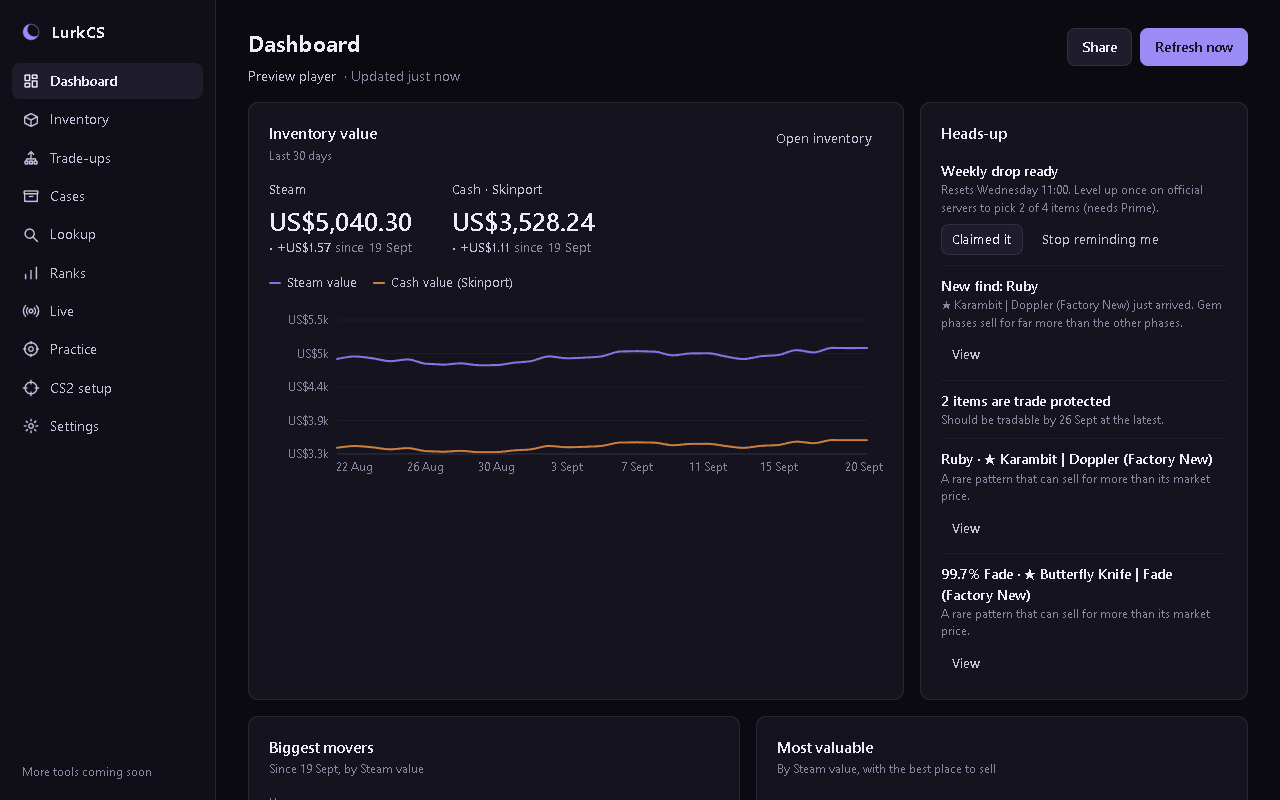
Inventory value
Your inventory's Steam and cash value over time, with daily snapshots, a value chart and each item's daily change.
Trade-up calculator
Pick 10 skins, or 5 Coverts for a knife or gloves, and see every result with its chance, exact float, price and average profit after fees.
Trade-up finder
Searches every collection for trade-ups that pay back more than they cost at Steam, Skinport or CSFloat prices, skipping skins that rarely sell.
Case odds
What each case, souvenir package and capsule pays back on average at current prices, using Valve's published drop rates.
Lookup
Paste an inspect link to see an item's float, pattern, Doppler phase, Fade %, StatTrak™ kills, name tag, stickers and charms.
Ranks and matches
Premier rating over time, map ranks and FACEIT level, with full scoreboards so you can size up the other team. Data from Leetify.
Live match stats
Score, kills, deaths, assists, MVPs, health and money while you play, through CS2's official Game State Integration.
Teammates and goals
Who you play with most and your win rate together, plus a CS Rating target with how far off it is and your pace.
Flagged players
Flag anyone you'd rather not play with. They're marked wherever they appear, and you're told when one shows up in a new match.
CS2 setup
Save crosshair codes with a preview of each, check your launch options and video settings, and back up your CS2 config.
Practice
Spray patterns with how far to pull for your sensitivity, plus callouts and the timings worth knowing.
Phone screen
Scan a QR code and your phone shows your score, money and buy call while CS2 stays fullscreen. Over your own Wi-Fi, never the internet.
Stream overlay
A see-through browser source for OBS showing your score, K/D and buy call, and nothing at all in menus.
Built to stay out of the game
- Never reads or changes game memory, and never injects anything into CS2.
- Live stats use Game State Integration, the official system HUD and overlay makers use, and only for your own player.
- Signing in happens on Steam's own page in your browser. LurkCS never sees your password and gets no access to your account.
- Everything it stores stays on your PC.
What you need
- Windows 10 or 11, 64-bit
- A public Steam inventory, for the value tracker (Steam, Profile, Privacy Settings, Inventory: Public)
- An internet connection, for prices and ranks
- No admin rights needed: it installs for your Windows user only
Latest release, 29 September 2026
What's new in 0.24.7
- Times stay up to date: "updated just now" and other times keep counting while LurkCS sits open, and charts move on to the new day at midnight
- Better translations: times like "about 5 min" and numbers with decimals now follow your language
- Clearer buttons: copying only says "Copied" when it worked, and if claiming your weekly drop fails you'll see why and can try again
- Fixes: switching two notifications quickly no longer undoes the first, and a new find's View button only shows while you still own the item
FAQ
Before you install.
Why does Windows say “Windows protected your PC”?
The installer isn't code-signed yet, so Windows doesn't recognise it. Click More info, then Run anyway.
Can LurkCS get me VAC banned?
LurkCS doesn't touch the game: it never reads or changes game memory or injects anything. Live stats come through Game State Integration, which Valve built for HUD and overlay makers. We can't speak for Valve, but LurkCS works the same way those tools do.
Is it really free?
Yes. It's free to download and use, and you don't need an account on this site.
Does it need my Steam password?
No. Signing in opens Steam's own sign-in page in your browser, which only tells LurkCS which account is yours. You can also just paste your profile link.
How do updates work?
LurkCS checks for new versions by itself, downloads them in the background and installs them the next time you restart it.
Why aren't the items in my storage units counted?
Steam doesn't make storage unit contents public, so LurkCS can't see them.
Ready to try it?
Free, and it keeps itself up to date. Questions or ideas go in the Discord.
Download for WindowsLurkCS isn't affiliated with or endorsed by Valve Corporation.